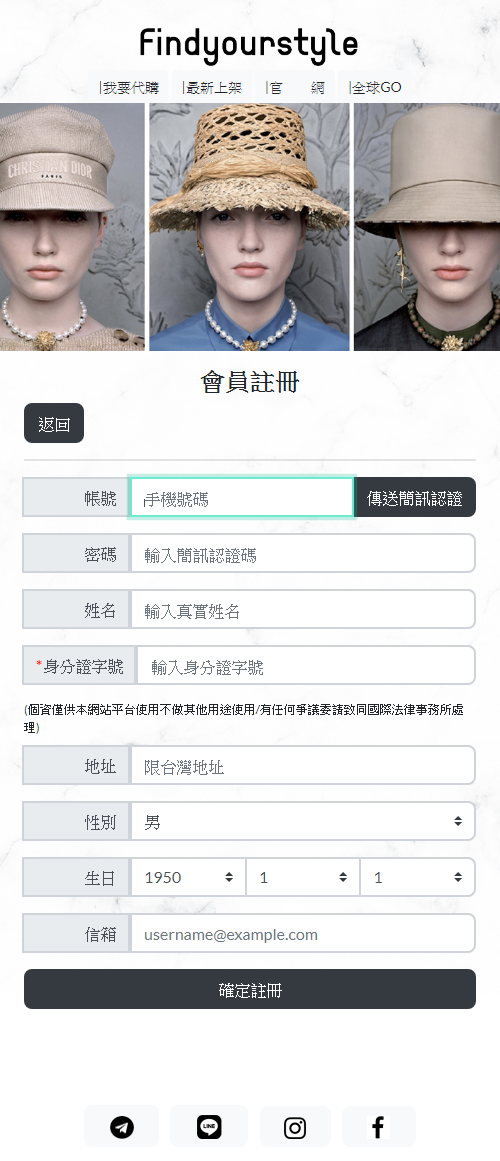
會員登入畫面搞定了,再來就是嵌入三竹簡訊API和後端處理機制了
--
2020年5月28日 星期四
2020年5月27日 星期三
Web RWD APP 代購系統 #1
這案子總算定版,確定版型了
客戶在月初急著要,也沒給樣板參考;到底要製作怎樣的樣式
弄得,我只好先初草版;一出~就開始有靈感.....延伸一堆新想法
這樣耗了2週,現這樣式總算是確定了
(接Web RWD APP 真的要心理準備,初版一定被全改的準備.....)
---
客戶在月初急著要,也沒給樣板參考;到底要製作怎樣的樣式
弄得,我只好先初草版;一出~就開始有靈感.....延伸一堆新想法
這樣耗了2週,現這樣式總算是確定了
(接Web RWD APP 真的要心理準備,初版一定被全改的準備.....)
---
2020年5月13日 星期三
2020年5月4日 星期一
2020年最新鉅作-服裝租借系統+電子發票#5
系統總算趕工完成了!
底下貼出來的是目前客戶端提出的統計分析項,現不多項;等以後客戶提出,再慢慢加了
服裝租借系統+電子發票;就到此初步完成! 後續就是封裝和讓客戶測試進行微調的工作了
接下又將展開新案件了...
底下貼出來的是目前客戶端提出的統計分析項,現不多項;等以後客戶提出,再慢慢加了
服裝租借系統+電子發票;就到此初步完成! 後續就是封裝和讓客戶測試進行微調的工作了
接下又將展開新案件了...
2020年4月24日 星期五
如何讓DataGridView每筆Row呈現不同的Cell Type
參考來源: [C#]如何讓DataGridView每筆Row呈現不同的Cell Type
--
C#
{
//如果是點在Value欄位的話才出現
if (e.ColumnIndex == 1)
{
DataGridViewRow tNowRow = dataGridView1.Rows[dataGridView1.CurrentRow.Index];
if (tNowRow.Cells["Type"].Value != null)
{
if (tNowRow.Cells["Type"].Value != null)
{
//如果是bool的話就變成CheckBox
if (tNowRow.Cells["Type"].Value.ToString() == "bool")
{
dataGridView1["Value", dataGridView1.CurrentRow.Index] = new DataGridViewCheckBoxCell();
}
//如果是combo的話就變成下拉選單
else if (tNowRow.Cells["Type"].Value.ToString() == "combo")
{
DataGridViewComboBoxCell tCell = new DataGridViewComboBoxCell();
for (int i = 0; i < tNowRow.Cells["AllowedValues"].Value.ToString().Split(';').Length; i++)
{
tCell.Items.Add(tNowRow.Cells["AllowedValues"].Value.ToString().Split(';')[i]);
}
dataGridView1["Value", dataGridView1.CurrentRow.Index] = tCell;
}
}
}
}
}
--
vbnet
If True Then
'如果是點在Value欄位的話才出現
If e.ColumnIndex = 1 Then
Dim tNowRow As DataGridViewRow = dataGridView1.Rows(dataGridView1.CurrentRow.Index)
If tNowRow.Cells("Type").Value IsNot Nothing Then
'如果是bool的話就變成CheckBox
If tNowRow.Cells("Type").Value.ToString() = "bool" Then
dataGridView1("Value", dataGridView1.CurrentRow.Index) = New DataGridViewCheckBoxCell()
'如果是combo的話就變成下拉選單
ElseIf tNowRow.Cells("Type").Value.ToString() = "combo" Then
Dim tCell As New DataGridViewComboBoxCell()
Dim i As Integer = 0
While i < tNowRow.Cells("AllowedValues").Value.ToString().Split(";"C).Length
tCell.Items.Add(tNowRow.Cells("AllowedValues").Value.ToString().Split(";"C)(i))
i += 1
End While
dataGridView1("Value", dataGridView1.CurrentRow.Index) = tCell
End If
End If
End If
End If
End If
--
C#
{
//如果是點在Value欄位的話才出現
if (e.ColumnIndex == 1)
{
DataGridViewRow tNowRow = dataGridView1.Rows[dataGridView1.CurrentRow.Index];
if (tNowRow.Cells["Type"].Value != null)
{
if (tNowRow.Cells["Type"].Value != null)
{
//如果是bool的話就變成CheckBox
if (tNowRow.Cells["Type"].Value.ToString() == "bool")
{
dataGridView1["Value", dataGridView1.CurrentRow.Index] = new DataGridViewCheckBoxCell();
}
//如果是combo的話就變成下拉選單
else if (tNowRow.Cells["Type"].Value.ToString() == "combo")
{
DataGridViewComboBoxCell tCell = new DataGridViewComboBoxCell();
for (int i = 0; i < tNowRow.Cells["AllowedValues"].Value.ToString().Split(';').Length; i++)
{
tCell.Items.Add(tNowRow.Cells["AllowedValues"].Value.ToString().Split(';')[i]);
}
dataGridView1["Value", dataGridView1.CurrentRow.Index] = tCell;
}
}
}
}
}
--
vbnet
If True Then
'如果是點在Value欄位的話才出現
If e.ColumnIndex = 1 Then
Dim tNowRow As DataGridViewRow = dataGridView1.Rows(dataGridView1.CurrentRow.Index)
If tNowRow.Cells("Type").Value IsNot Nothing Then
'如果是bool的話就變成CheckBox
If tNowRow.Cells("Type").Value.ToString() = "bool" Then
dataGridView1("Value", dataGridView1.CurrentRow.Index) = New DataGridViewCheckBoxCell()
'如果是combo的話就變成下拉選單
ElseIf tNowRow.Cells("Type").Value.ToString() = "combo" Then
Dim tCell As New DataGridViewComboBoxCell()
Dim i As Integer = 0
While i < tNowRow.Cells("AllowedValues").Value.ToString().Split(";"C).Length
tCell.Items.Add(tNowRow.Cells("AllowedValues").Value.ToString().Split(";"C)(i))
i += 1
End While
dataGridView1("Value", dataGridView1.CurrentRow.Index) = tCell
End If
End If
End If
End If
End If
2020年4月23日 星期四
2020年4月22日 星期三
VBNET 將字串分割,並產生字串陣列
VBNET 將字串分割,並產生字串陣列
Public Class Form1
Private Sub Form1_Load(ByVal sender As System.Object, ByVal e As System.EventArgs) Handles MyBase.Load
' === 字串切割 ===
Dim MyString = "09/02/04 4:00p 21.9 21.9 21.8 69 15.9 3.6 NE 2.15 6.3 "
Dim charSeparators() As Char = {" "c}
Dim strResult() = MyString.Trim().Split(charSeparators, StringSplitOptions.RemoveEmptyEntries)
' === 顯示 ===
For i As Integer = 0 To strResult.Length - 1
Me.TextBox1.Text += strResult(i) + Environment.NewLine
Next
End Sub
End Class
-------
另外 微軟又有調整新的用法
Strings.Split(String, String, Int32, CompareMethod) 方法
Dim testString As String = "apple pear banana "
Dim testArray() As String = Split(testString)
' testArray holds {"apple", "", "", "", "pear", "banana", "", ""}
Dim lastNonEmpty As Integer = -1
For i As Integer = 0 To testArray.Length - 1
If testArray(i) <> "" Then
lastNonEmpty += 1
testArray(lastNonEmpty) = testArray(i)
End If
Next
ReDim Preserve testArray(lastNonEmpty)
' testArray now holds {"apple", "pear", "banana"}
Public Class Form1
Private Sub Form1_Load(ByVal sender As System.Object, ByVal e As System.EventArgs) Handles MyBase.Load
' === 字串切割 ===
Dim MyString = "09/02/04 4:00p 21.9 21.9 21.8 69 15.9 3.6 NE 2.15 6.3 "
Dim charSeparators() As Char = {" "c}
Dim strResult() = MyString.Trim().Split(charSeparators, StringSplitOptions.RemoveEmptyEntries)
' === 顯示 ===
For i As Integer = 0 To strResult.Length - 1
Me.TextBox1.Text += strResult(i) + Environment.NewLine
Next
End Sub
End Class
-------
另外 微軟又有調整新的用法
Strings.Split(String, String, Int32, CompareMethod) 方法
Dim testString As String = "apple pear banana "
Dim testArray() As String = Split(testString)
' testArray holds {"apple", "", "", "", "pear", "banana", "", ""}
Dim lastNonEmpty As Integer = -1
For i As Integer = 0 To testArray.Length - 1
If testArray(i) <> "" Then
lastNonEmpty += 1
testArray(lastNonEmpty) = testArray(i)
End If
Next
ReDim Preserve testArray(lastNonEmpty)
' testArray now holds {"apple", "pear", "banana"}
2020年4月7日 星期二
2020年最新鉅作-服裝租借系統+電子發票#4
POS功能面及電子發票區塊總算完成了,接下來要將租借訂單串聯POS付款結帳
和一些帳統計及報表
整個系統架構為多門市多機台模式,每一基座均可前台.後台併用
歡迎市面相關服裝租借又想要併POS系統的店家,來洽詢喔
google : 池龍工作室
就能找到跟我聯絡的方式
---
和一些帳統計及報表
整個系統架構為多門市多機台模式,每一基座均可前台.後台併用
歡迎市面相關服裝租借又想要併POS系統的店家,來洽詢喔
google : 池龍工作室
就能找到跟我聯絡的方式
---
訂閱:
文章 (Atom)